
Download Bespoke – AI‑Powered Custom Podcast Generator, Free & Secure
What Is Bespoke? – A Comprehensive Overview
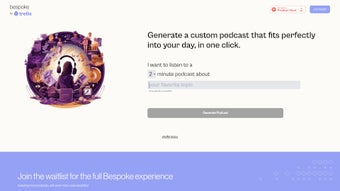
Bespoke is a cutting‑edge, AI‑driven web application that lets anyone turn a simple text prompt into a fully‑produced podcast episode with just a few clicks. Built on the latest large‑language‑model technology, the platform synthesizes natural‑sounding narration, background music, and subtle sound effects to deliver a polished audio briefing in minutes rather than hours. Whether you are a researcher needing a concise summary of a complex legal concept, a marketer looking to create an engaging brand story, or a hobbyist eager to explore niche topics such as “urban beekeeping” or “quantum ethics,” Bespoke adapts its voice, tone, and length to match your exact specifications.
The service operates entirely in the cloud, meaning there is no need to download or install any software. Users simply open a modern browser, log in, and start generating content. Bespoke also doubles as a discovery hub, showcasing a curated feed of trending podcasts and popular shows that can inspire new ideas or serve as a quick listening option.
Security and privacy are baked into the platform: all data is transmitted over TLS‑encrypted connections, stored on GDPR‑compliant servers, and never shared without explicit consent. Although Bespoke is currently in a public beta phase with a waitlist for upcoming premium tools, the core podcast‑generation feature is free and fully functional. This makes it an attractive solution for both casual listeners and professional creators who need a fast, reliable way to produce high‑quality audio without the traditional recording, editing, and mixing workflow.
By combining AI efficiency with a user‑friendly interface, Bespoke is redefining how audio content is created and consumed.
Key Features That Distinguish Bespoke from Other Podcast Tools
- One‑Click Generation: Input a topic, choose a voice style and duration, and the AI assembles a complete episode in seconds.
- Rich Topic Library: Access thousands of pre‑indexed subjects ranging from scientific breakthroughs to cultural anecdotes, ensuring relevance for any audience.
- Customizable Audio Settings: Select narration speed, background music genre, and sound‑effect intensity to match brand tone or personal preference.
- Multi‑Language Support: Generate podcasts in English, Spanish, German, French, and several additional languages, expanding global reach.
- Secure Cloud Processing: All audio rendering occurs on encrypted servers; no local files are stored unless you explicitly download them.
- Responsive Design: Optimized for desktops, laptops, tablets, and smartphones, providing a seamless experience across Windows, macOS, Linux, iOS, and Android.
- Trending & Curated Feeds: Explore a live feed of popular podcasts and AI‑suggested episodes to spark inspiration or stay updated on industry news.
- Future‑Ready Roadmap: Early adopters receive priority access to upcoming features such as collaborative editing, detailed analytics dashboards, and premium voice personas.
Installation, Usage Guide & System Compatibility
Because Bespoke is a pure web‑based service, there is no traditional installation process. All you need is a recent browser (Chrome, Firefox, Edge, or Safari) and a stable internet connection. Follow these steps to start creating podcasts:
- Visit the Official Site: Go to bespoke.ai and click “Join the Waitlist” or “Sign In” if you already have an account.
- Create Your Account: Enter a valid email address, set a strong password, and confirm via the verification link sent to your inbox.
- Start a New Project: In the dashboard, type your desired topic, select episode length (e.g., 5‑minute briefing or 20‑minute deep dive), and pick a voice style (conversational, formal, energetic).
- Adjust Audio Preferences: Choose background music from the built‑in library, toggle sound effects, and set the speaking speed. Real‑time previews let you fine‑tune each element.
- Generate & Review: Click “Generate.” The AI processes the request on secure servers and returns a playback link. Listen, request minor edits, or proceed to download.
- Export or Share: Download the MP3, embed it on a website, upload to your podcast host, or share directly via the provided social media link.
Supported Platforms
- Windows 10/11 (any modern browser)
- macOS Monterey or later
- Linux distributions with up‑to‑date browsers
- iOS 13+ (Safari or Chrome)
- Android 8.0+ (Chrome, Firefox)
Performance depends mainly on bandwidth; a minimum of 10 Mbps download speed is recommended for smooth generation. Because all processing happens in the cloud, even low‑end devices can create high‑quality podcasts without lag. The platform also supports screen‑reader accessibility, making it inclusive for visually impaired creators.
Final Verdict, Pros & Cons, FAQ and How to Get Started
Pros
- Instant, one‑click podcast creation saves considerable time.
- AI‑generated narration sounds natural and is highly customizable.
- Fully web‑based – no downloads, works on any modern device.
- Secure, GDPR‑compliant data handling and encrypted cloud processing.
- Extensive topic library and multi‑language support broaden audience reach.
Cons
- Beta version caps episode length at 30 minutes.
- Advanced analytics and collaborative editing are locked behind a future‑release waitlist.
- Requires an active internet connection; offline generation isn’t possible.
- Voice selection, while varied, does not cover every regional accent.
Frequently Asked Questions
Is Bespoke free to use?
The core podcast‑generation feature is free during the beta phase. Premium upgrades such as longer episodes and detailed analytics will be offered as paid plans later.
Can I download the generated podcast for offline listening?
Yes. After generation, a download button provides an MP3 file that you can store locally, embed on a website, or upload to any podcast host.
How secure is my data on Bespoke?
Bespoke uses TLS‑encrypted connections and stores data on GDPR‑compliant servers. Audio files remain private unless you explicitly share a public link.
Do I need any special hardware to use Bespoke?
No special hardware is required. A standard computer, tablet, or smartphone with a recent web browser is sufficient.
Can I customize the voice tone or language?
Yes. Bespoke offers multiple voice styles (conversational, formal, upbeat) and supports several languages, including English, Spanish, German, and French.
In summary, Bespoke delivers a powerful blend of AI automation and creative flexibility that makes podcast production accessible to everyone. While the beta version has modest limitations, the roadmap promises richer features that will appeal to both hobbyists and professional creators. If you’re ready to generate custom audio content quickly, securely, and without any software download, visit Bespoke today, join the waitlist, and start your first AI‑crafted episode. Experience the future of podcasting—tailored, fast, and secure.
Pros: Instant creation, extensive topic library, free core version, secure cloud processing.
Cons: Episode length limit in beta, offline generation not available, some premium features locked.



.png)



